
Welcome back to the Genome Toolkit series!
If you have been following REBELSCIENCE and our Genome Toolkit series for a while, you know that it has been quite a while since our last video. A few years, actually. And a lot has changed across software engineering, bioinformatics, and scientific research.
In Parts 1, 2, and 3, we built our first useful bioinformatics algorithms using a very small Python project:
genome_toolkit/
├── .git/
├── .gitignore
├── application.py
├── genome_toolkit.py
├── Pipfile
└── Pipfile.lock
That project already works. application.py creates our genomeToolkit object, runs the two k-mer algorithms we have built so far, and gives us:
Sequence: AATTTTAAAAC
k-mer: AA
Repeats found: 4
Most frequent k-mer: ['TTT', 'AAA']
This was exactly the right structure for learning our first algorithms. We could keep everything close together, focus on the biology and Python, and immediately see what our code produced.
We are absolutely going to continue building Genome Toolkit. We want to add more biological sequence types, load real biological data from files and databases, add more bioinformatics algorithms, and eventually use those tools together in larger experiments.
Before we add all of that, however, we are going to improve the structure underneath the project and turn Genome Toolkit into a small scientific Python package.
That process is called refactoring. Refactoring means reorganizing and improving the structure of existing software without changing what its core functionality is supposed to do.
And by doing this now, relatively early in the project, we are going to get something pretty amazing almost for free. While we are turning Genome Toolkit into a cleaner, more professional scientific Python package, we are also gradually making it AI-ready.
We will see exactly what that means as we progress through Parts 4.x. For now, the important idea is simple: the same clean, tested Genome Toolkit that we use ourselves will also become much easier for APIs, MCP tools, and AI agents to use later, without having to rebuild our scientific logic every time.
We will keep using the same working Genome Toolkit while we improve it step by step. application.py will remain our familiar test: after each major change, we can run it again and make sure our original calculations still work.
A Note for the Biologists
The next few parts will contain more software engineering than Parts 1 through 3, but our biological goal is not changing. We are still building Genome Toolkit so we can work with biological sequences, run useful algorithms, and eventually combine those tools into real experiments.
The workflow will stay familiar:
biological data
      ↓
Genome Toolkit
      ↓
scientific result
We are simply going to make the code underneath that workflow cleaner, easier to test, and easier to expand.
You do not need to become a Python packaging expert to use Genome Toolkit. If your main interest is biology, you can treat these parts as the engineering foundation underneath the experiments we will build later.
What Refactoring Means for Genome Toolkit
Right now, our project is very simple:
application.py
      ↓
genome_toolkit.py
      ↓
two working algorithms
As Genome Toolkit grows, we want something closer to:
application.py
      ↓
genome_toolkit package
      ↓
biological sequences
(DNA, RNA, proteins, etc.)
      ↓
data loaders
(FASTA, NCBI, other formats and sources)
      ↓
algorithms
(k-mer analysis, future sequence algorithms, etc.)
      ↓
scientific results
(results together with useful context)
The important point is that the scientific purpose stays the same. We are not changing count_kmer() just because we are reorganizing the project, and we are not changing find_most_frequent_kmers() just because the files around it move.
We will improve the project structure first. Later, when we add automated tests, we can look at real edge cases and deliberately decide whether any algorithm behavior needs to change.
Why Build a Scientific Python Package?
Our current two-file project works, but it was designed for a much smaller job. As Genome Toolkit grows, we will need to handle more than just two algorithms.
For example, we are going to need code for things such as:
- representing and checking biological sequences;
- loading sequence data from plain-text and FASTA files;
- running different families of bioinformatics algorithms;
- returning scientific results with useful context;
- testing that calculations and error cases behave correctly.
If all of that grows inside one file, the project quickly becomes difficult to understand and change. A package lets us separate those jobs into smaller parts that each have a clear purpose.
For example:
genome_toolkit/
├── sequence/
├── load/
└── algorithms/
sequence/ can contain code for biological sequences such as DNA. load/ can contain code for reading biological data from files. algorithms/ can contain the scientific calculations themselves.
This also makes Genome Toolkit much easier to reuse. Instead of treating it as a couple of Python files that belong to one project folder, we will be able to install it and use it like a normal Python library:
import genome_toolkitThat means the same tested scientific code can later be used from another Python script, a Jupyter notebook, a larger research project, a web application, or another tool.
For us, this is also a useful step from an educational project toward a real portfolio project. We are not only showing that we can write individual bioinformatics algorithms. We are showing that we can organize those algorithms into scientific software that other people can install, test, reuse, and expand.
Our goal with this refactoring is to move from the following type of simple script output:
[Genome Toolkit Initiated]

Sequence: AATTTTAAAAC
k-mer: AA
Repeats found: 4
Most frequent k-mer: ['TTT', 'AAA']
To a scientific results like these:
{
  "metadata": {
    "toolkit_version": "0.1.0",
    "algorithm": "count_kmer",
    "timestamp": "2026-08-24T09:30:53.399181Z"
  },
  "inputs": {
    "sequence": {
      "identifier": "M57671.1",
      "description": "Octodon degus insulin mRNA, complete cds",
      "length": 126
    }
  },
  "parameters": {
    "kmer": "CCTT"
  },
  "output": {
    "count": 5
  }
}

{
  "metadata": {
    "toolkit_version": "0.1.0",
    "algorithm": "find_most_frequent_kmers",
    "timestamp": "2026-08-24T09:30:53.400405Z"
  },
  "inputs": {
    "sequence": {
      "identifier": "M57671.1",
      "description": "Octodon degus insulin mRNA, complete cds",
      "length": 126
    }
  },
  "parameters": {
    "k_len": 5
  },
  "output": {
    "kmers": [
      "CTTGG",
      "TTGGG",
      "TGGGC",
      "GGGCC"
    ],
    "frequency": 6
  }
}
Preparing Genome Toolkit for APIs, MCP, and AI Agents
There is another reason this structure is becoming increasingly useful.
Today, scientific software does not have to be used only by someone manually writing Python code. The same package can later be connected to a web interface, an API, or an AI agent.
An API, or Application Programming Interface, gives one program a structured way to use another program. MCP, or Model Context Protocol, gives AI systems a standardized way to connect to external tools.
We will explain both properly when they become relevant. For now, the important idea is simply that Genome Toolkit can become the tested scientific tool underneath those systems.
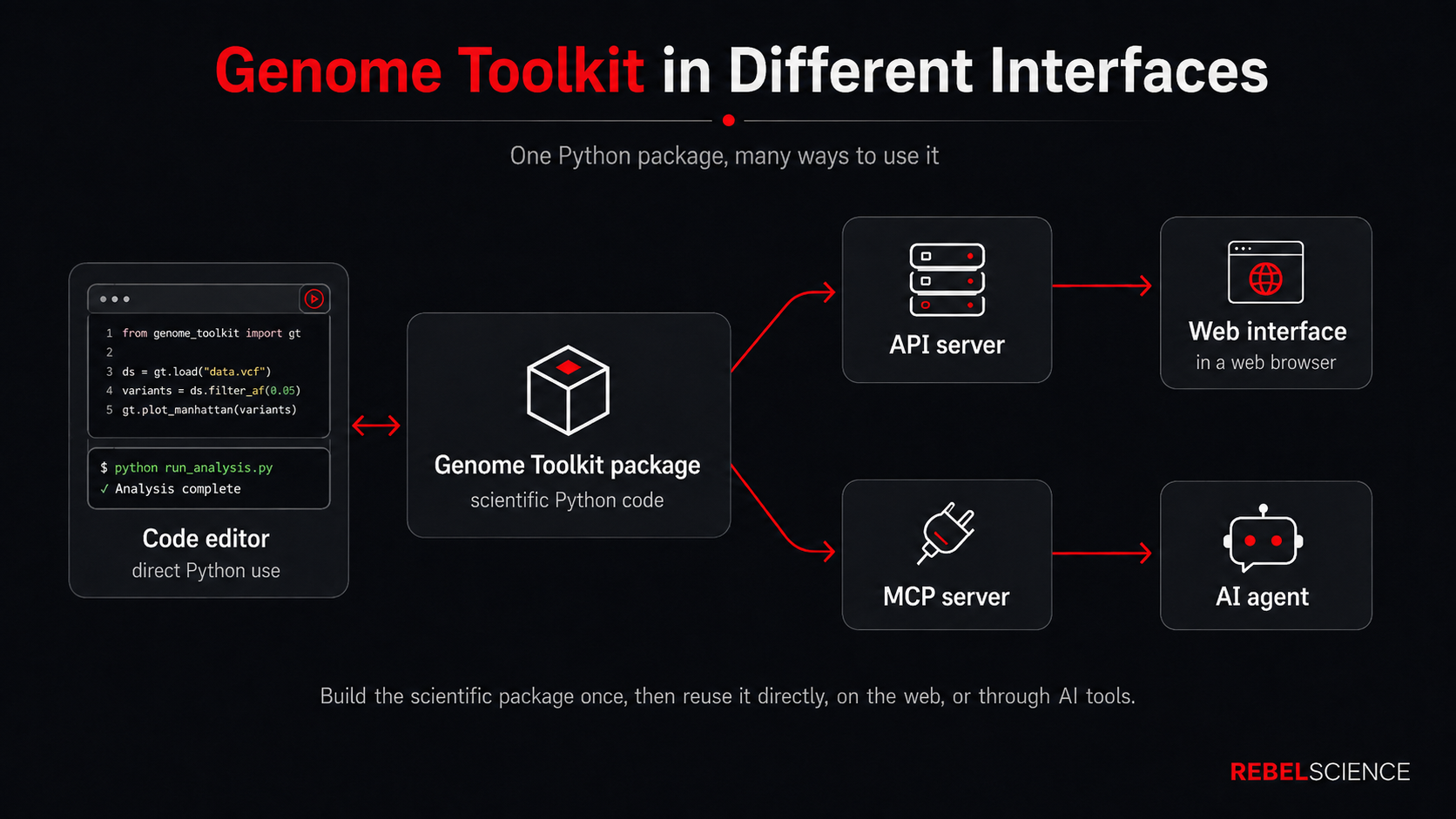
Imagine asking an AI agent:
Find 100 genomes of this bacterium, run our k-mer analyses on them, compare the results, and prepare a summary.
Without dedicated scientific tools, the AI has to figure out much of that workflow by itself. It may search for genome sequences from different places, choose how to download them, write analysis code while it is working, pick libraries, and decide how to organize the calculations.
That flexibility can be useful, but it creates a problem for science. Modern language models are non-deterministic, which means they can make different choices across separate runs. If the AI is also writing the algorithms and deciding where the data comes from every time, reproducing exactly the same experiment becomes much harder.
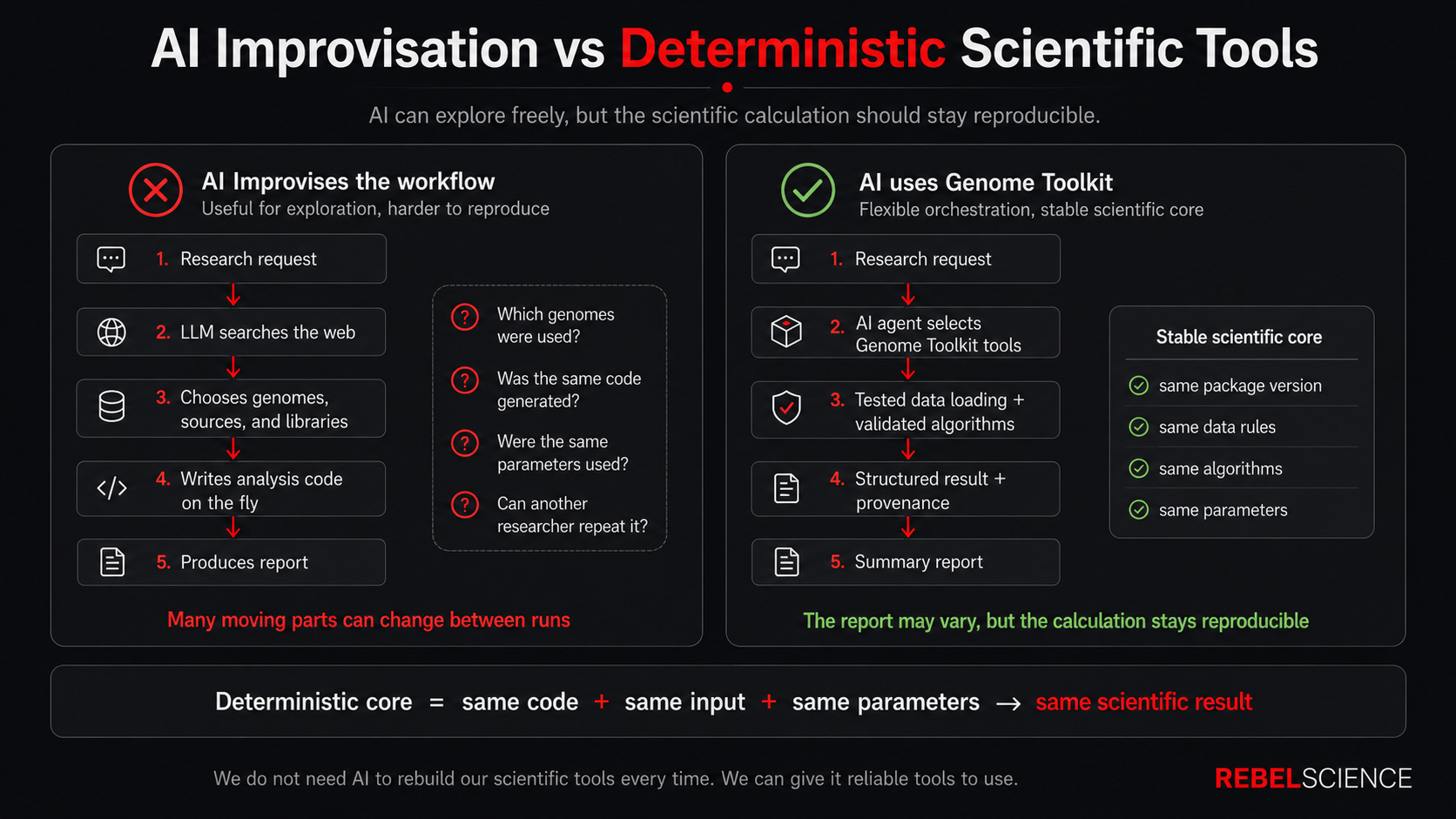
Now imagine that the AI can use Genome Toolkit instead.
AI agent
    ↓
Genome Toolkit tools
    ↓
tested scientific calculations
    ↓
structured results
The AI can still help organize the work, choose which tools to call, compare many results, and prepare a report. But the actual k-mer calculation can come from the same count_kmer() function that we already wrote, understand, and test.
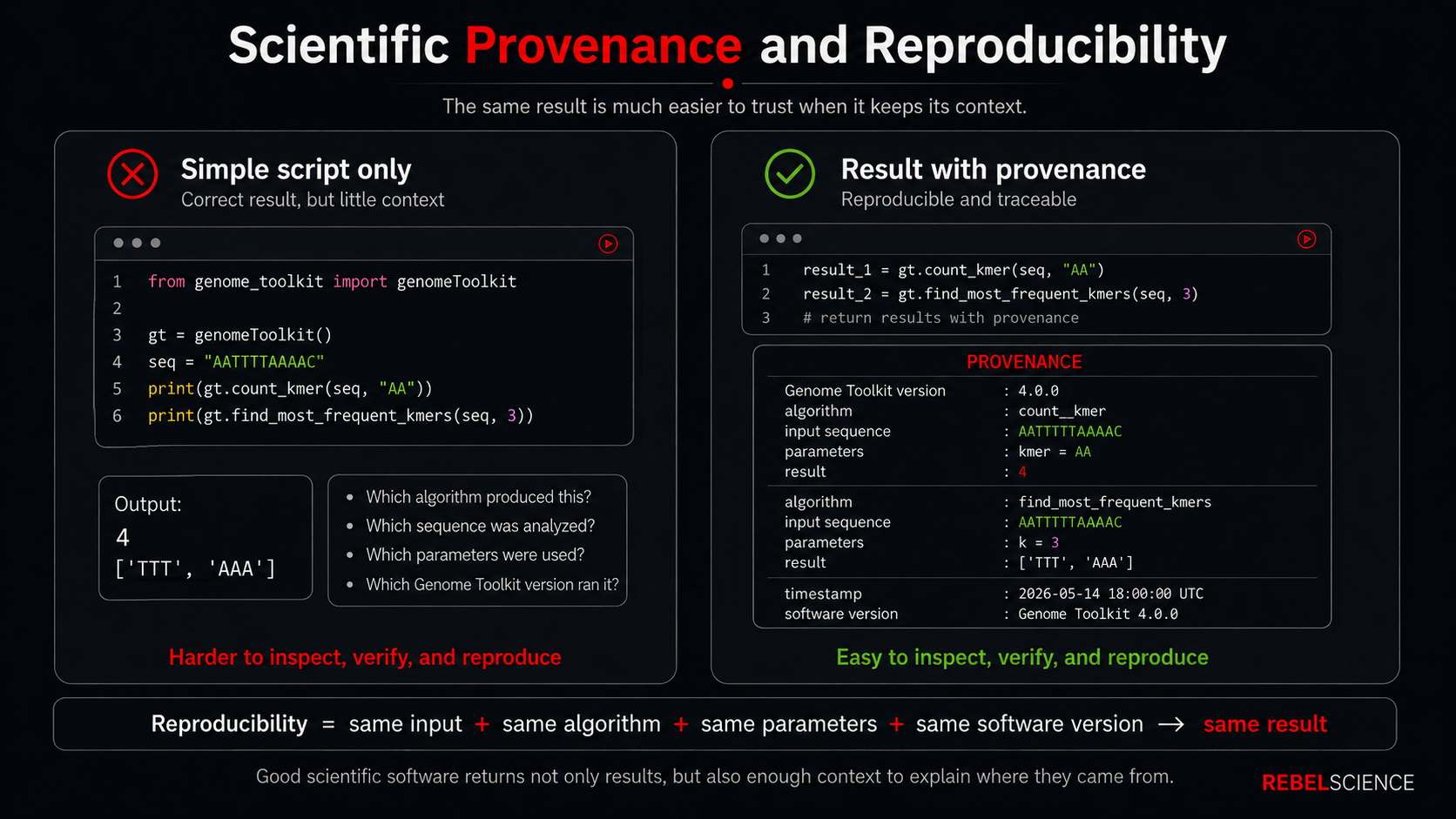
The same idea applies to loading biological data. Instead of inventing a new FASTA parser every time, the AI can use our loader. Instead of returning a number with no context, Genome Toolkit can later return a structured result that tells us which sequence, parameters, algorithm, and software version produced it.
This is where reproducibility and provenance become important. Reproducibility means that we should be able to repeat the same scientific calculation using the same data, algorithm, parameters, and software version. Provenance means keeping enough information to understand where a result came from.
We are not going to build all of that in this article. We will introduce each piece when we actually need it and can immediately see what problem it solves.
For now, the high-level idea is enough:
Python script / notebook / web app / AI agent
                    ↓
              Genome Toolkit
                    ↓
          tested scientific code
                    ↓
             scientific result
Genome Toolkit itself will stay focused on the science. Web servers, APIs, MCP connections, authentication, databases, and AI-agent logic can live outside the package and use Genome Toolkit as the scientific core underneath them.
What We Will Build Next
Over the next few parts, we will gradually turn the same working project into a modern scientific Python package.
At a high level, we will:
- modernize the project with
uvand a proper Python package structure; - add validated biological sequence objects such as
DNA; - load biological data from plain-text and FASTA files;
- return more useful scientific results;
- add automated tests and clearer error behavior.
We do not need to understand all of those pieces yet. We will introduce them one at a time, when we actually build and use them.
The important thing to remember is where we are going:
biological data
      ↓
Genome Toolkit
      ↓
tested algorithms
      ↓
scientific results
Everything else we add is there to make that workflow easier to use, easier to trust, and easier to expand.
Summary
Our original Genome Toolkit project was exactly what we needed for learning our first algorithms. Now we want to grow it into a scientific Python package that can handle biological sequences, external data, more algorithms, better results, and automated testing without becoming difficult to maintain.
The scientific goal stays the same. We are still building a practical bioinformatics toolkit, and our existing k-mer algorithms remain the starting point.
The new package structure will also make Genome Toolkit much easier to reuse from other Python projects, notebooks, future web applications, APIs, MCP tools, and AI agents. Most importantly, it gives us a cleaner foundation for building scientific workflows that are easier to test, understand, and reproduce.
What is Next?
In Genome Toolkit Part 4.2, we will finally start changing the project.
We will begin by running our current application.py one more time and confirming the familiar output. Then we will modernize the same project with uv, create a proper Python package structure, move our existing k-mer algorithms into it, and run application.py again.
That gives us a very simple first goal: change how Genome Toolkit is organized while keeping the scientific calculations working.
From there, we will continue one useful step at a time.
I hope this introduction to building our scientific Python package was useful for your bioinformatics and programming journey! If you found this article valuable and want to help us continue building REBELSCIENCE, please consider supporting our project. You can explore various ways to contribute here.
Until next time, rebelCoder, signing out.
A video version of this article:
Loading the conversation…